Login to Google Account using VBA
Here is a simple code that will login to Google accounts with the provided user-name and password.
The program requires references to the following:
1 Microsoft Internet Controls
2. Microsoft HTML Object Library

Microsoft HTML Object Library- VBA Reference
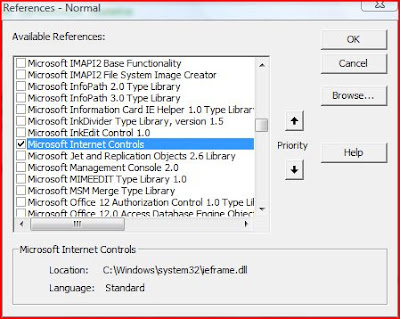
Microsoft Internet Controls - VBA Reference
The Internet control is used to browse the webpage and the HTML Objects are used to identify the username and password textboxes and submit the text using the control button.
Dim HTMLDoc As HTMLDocument
Dim oBrowser As InternetExplorer
Sub Login_2_Website()Dim oHTML_Element As IHTMLElement
Dim sURL As StringOn Error GoTo Err_ClearsURL = "https://www.google.com/accounts/Login"Set oBrowser = New InternetExplorer
oBrowser.Silent = True
oBrowser.timeout = 60
oBrowser.navigate sURL
oBrowser.Visible = True
Do
' Wait till the Browser is loaded
Loop Until oBrowser.readyState = READYSTATE_COMPLETE
Set HTMLDoc = oBrowser.Document
HTMLDoc.all.Email.Value = "sample@vbadud.com"
HTMLDoc.all.passwd.Value = "*****"
For Each oHTML_Element In HTMLDoc.getElementsByTagName("input")
If oHTML_Element.Type = "submit" Then oHTML_Element.Click: Exit For
Next' oBrowser.Refresh ' Refresh If NeededErr_Clear:
If Err <> 0 Then
Debug.Assert Err = 0
Err.Clear
Resume Next
End IfEnd Sub
See Also :
http://vbadud.blogspot.com/2008/05/google-search-using-vba.html


 Posts
Posts


