How to Run an Excel Macro from PowerPoint
Before writing code for doing it you need to add Excel Library to the PowerPoint VBE Project
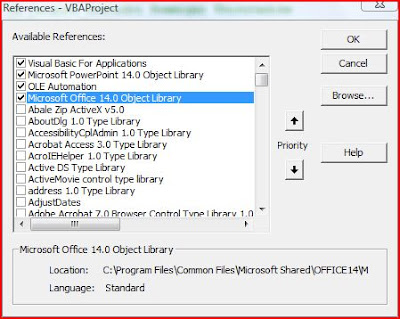 Powerpoint VBE Screen
 Excel Library in the References
This can be done from Powerpoint VBE-->Tools-->References -->Browse for the particular reference and add them.
We have the Excel macros embedded in a workbook (CanBeDeleted.xlsm)
Sub AnotherWrkBook_Macro()

MsgBox "I have Run!"


End Sub
Above code is a simple message box. The code below, however, accepts an argument and stores the same in the workbook
Function Store_Value(ByVal sPPTName As String)

Sheet1.Range("A2").Value = sPPTName


End Function
The following Powerpoint VBA code uses Application.Run method of Excel VBA to execute a particular macro.
Multiple arguments can be passed to Application.Run method
Sub Run_Excel_Macro_From_PPT()

Dim oXL As Excel.Application            ' Excel Application Object
Dim oWB As Excel.Workbook               ' Excel Workbook Object
Dim sPName As String                    ' Variable - Active Presentation Name

On Error GoTo Err_PPXL

' -----------------------------------------------------------
' coded by Shasur for http://vbadud.blogspot.com
' -----------------------------------------------------------

Set oXL = New Excel.Application
Set oWB = oXL.Workbooks.Open("C:\Users\comp\Documents\CanBeDeleted.xlsm")

' Set Excel as Visibile - Turn Off if not needed
oXL.Visible = True

' Pass and Argument
sPName = ActivePresentation.Name

' Run the Macro without Argument
oXL.Application.Run "'CanBeDeleted.xlsm'!AnotherWrkBook_Macro"

' Run the Macro without Argument
oXL.Application.Run "'CanBeDeleted.xlsm'!Store_Value", sPName

' Save and Close the Workbook
oWB.Save
oWB.Close (False)


' Quit the Excel
oXL.Quit


' Release Objects - Good Practive
If Not oWB Is Nothing Then Set oWB = Nothing
If Not oXL Is Nothing Then Set oXL = Nothing


Err_PPXL:
If Err <> 0 Then
    MsgBox Err.Description
    Err.Clear
End If
End Sub
The macro saves and closes the workbook and quits Excel
See also:
Execute a macro in a different workbook
Run a Automatic Macro in Word Document


 Posts
Posts


