The following code lists all the directories under c:\Temp
Function GetSubDir(ByVal sDir)

    Dim oFS As New FileSystemObject
    Dim oDir

    Set oDir = oFS.GetFolder(sDir)
    For Each oSub In oDir.SubFolders
        MsgBox oSub.Path
        GetSubDir oSub.Path
    Next oSub
End Function
You can call the function like shown below
GetSubDir "C:\Temp\"
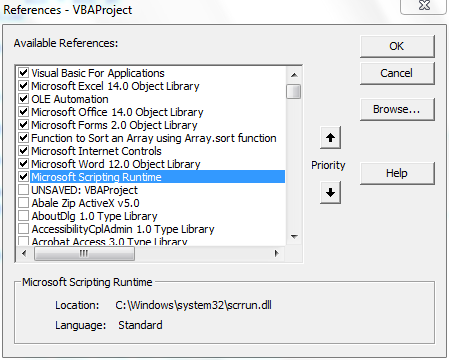
The code uses FileSystemObject from Microsoft Scripting RunTime. You need to add reference to this library (see figure below)
See also VBA Dir Function to Get Sub Directories
Hi Shasur
ReplyDeleteI need your help on this
I need one macro by which i can take data from text boxes in slides(to excel or notepad or in first slide)
for example : i show a engine pic in one slide and call out its parts in text boxes. I need to make a list of all part which i included in Text box..
Please please help me on this
Hi Rahul
ReplyDeleteCheck if this post (http://vbadud.blogspot.com/2010/05/how-to-extract-textbox-contents-from.html) helps you
Cheers
Shasur
this is not working it says
ReplyDeletesub or function not defined oSub
Hi . I believe you have set the Option Explicit. This is good
DeletePlease declare Dim oSub. It should work for you